
Sun Smart
❋
Project Overview
This e-learning module was designed to teach learners about sun safety and UV protection through an engaging, interactive experience. I wrote and edited the Sun Safe video, produced the voiceover with Eleven Labs, and developed an interactive labeled slide and action map to guide learners through practical sun safety behaviors.
Design Process
-
This module is designed for anyone who spends time outdoors and wants to learn how to protect themselves from harmful sun exposure.
It is suitable for students, outdoor enthusiasts, families, and community members, providing practical, actionable skills that can be applied in everyday life.
-
1. Analyze
Identified the need for engaging, age-appropriate sun safety education.2. Design
Created action map to structure the learning flow and interactive activities.
Planned an interactive labeled slide to clearly visualize sun-safe behaviors.3. Develop
Wrote and edited the Sun Safe video content.
Produced the voiceover using Eleven Labs for clear, engaging narration.
Built interactive slides with labels and action points to reinforce key objectives.4. Evaluate
Tested the module for usability and comprehension.
Refined visuals, interactive elements, and instructional flow based on feedback.This process demonstrates my ability to create interactive, multimedia-rich learning experiences from concept to final production.
-
Articulate 360 – Built interactive slides and structured the e-learning module.
Canva – Designed storyboards, visuals, and graphics for the module.
Adobe Creative Cloud – Edited and refined video and multimedia content.
Eleven Labs – Produced realistic voiceover narration for the video content.
Interactive Labeled Slide – Visualized key sun safety behaviors.
Action Map – Guided learners through step-by-step sun-safe actions.
Multimedia Integration – Combined text, visuals, audio, and interactive elements to enhance engagement and learning.
Problem
Many individuals, from children to adults, struggle to consistently practice sun-safe behaviors, increasing the risk of harmful UV exposure. Traditional resources, like pamphlets or static guides, often fail to engage learners or provide practical, actionable guidance.
solution
I designed a scenario-based e-learning module that uses interactive slides, an action map, and video content with voiceover to teach sun safety. Immediate feedback and multimedia elements guide learners through practical behaviors, helping them understand and apply sun protection strategies in real-life situations.
outcome
Learners gain practical, real-world skills to protect themselves from harmful sun exposure. Interactive exercises, labeled slides, and the action map reinforce key concepts, empowering learners to adopt safe sun habits in their daily lives.
Scenario-Based Quiz Interaction
(Articulate 360)
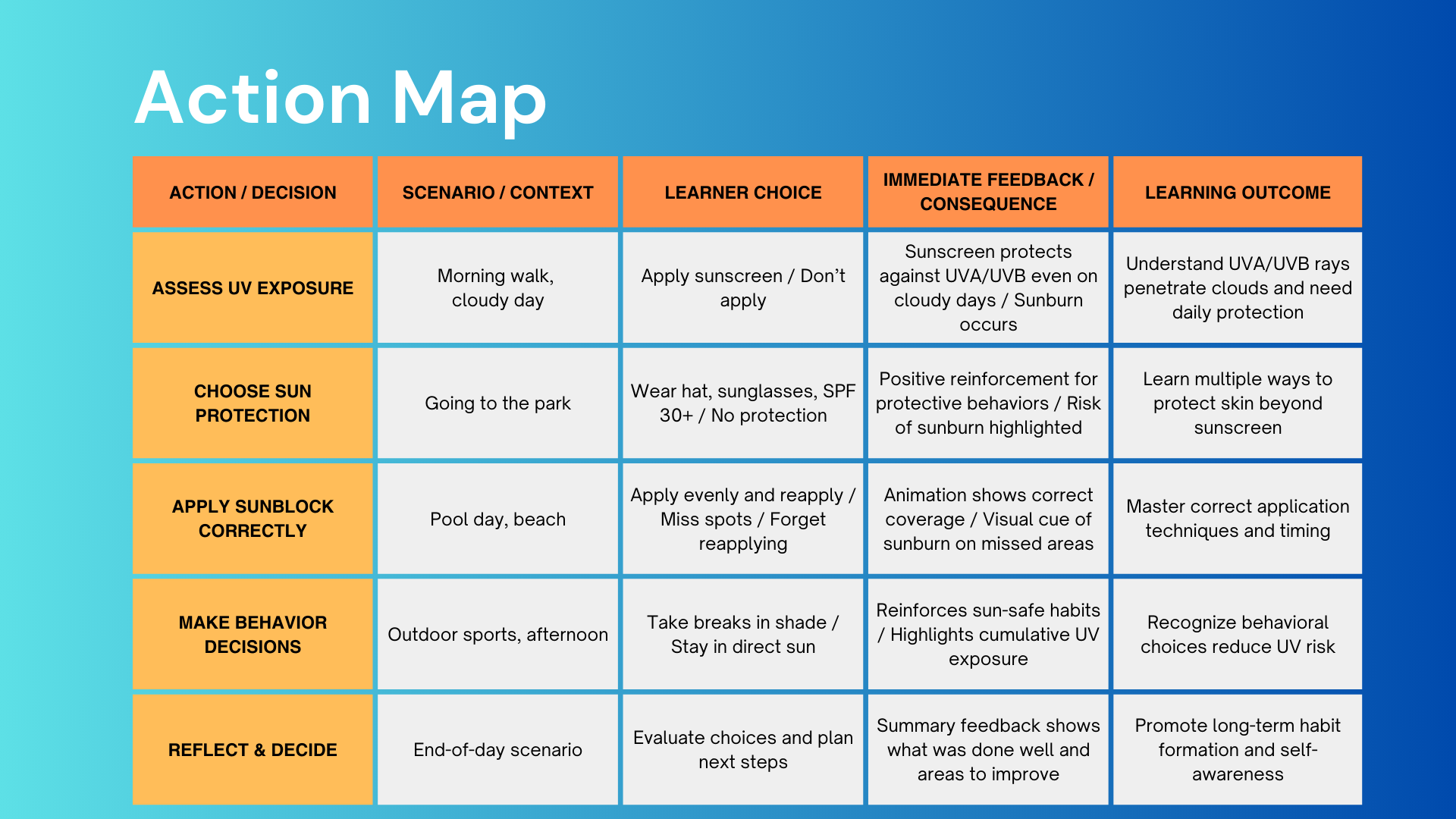
The action map visually breaks down the quiz structure, mapping how learners’ choices lead to different scenarios, feedback, and learning outcomes. It ensures that every decision in the quiz reinforces key concepts, guides learners through correct and safe actions, and provides a clear view of how interactive elements connect to learning objectives.
Interactive Labeled Graphic
(Quiz Pathway)
This interactive labeled graphic, created in Articulate, demonstrates how key information can be explored through clickable hotspots and guided labels. Learners can engage with each labeled element to reveal context-specific details, reinforcing core concepts through visual interaction and immediate feedback. This format supports clear understanding by breaking complex information into accessible, interactive components that promote safe and correct application of knowledge.
Support video
I produced this video to support an interactive learning experience for a sun safety module. The design ensures a clear, intuitive user journey while reinforcing key sun safety concepts. Voiceover narration was created using ElevenLabs, visual elements were developed in Canva, and the final video was edited and assembled in Adobe Premiere Pro.